











O seu guia para a soberania!
Step-by-step guide to Sparrow Wallet: advanced Bitcoin wallet
Share your love

Sparrow Wallet is an advanced Bitcoin wallet aimed at those looking for control, privacy and financial sovereignty. Unlike simpler wallets, Sparrow is designed for users who already understand the basics of Bitcoin and want a more complete view of the wallet.
In this guide, you will learn how the Sparrow Wallet works, and how to use it consciously and safely.
Table of contents:
- What is the Sparrow Wallet?
- Sparrow Wallet's main features
- Is the Sparrow Wallet for you?
- How to download and install Sparrow Wallet (beginning of the step-by-step guide)
- Advantages and disadvantages of the Sparrow Wallet
What is the Sparrow Wallet?
Sparrow Wallet is an open source Bitcoin wallet developed with a focus on privacy, security and transparency. It runs on computers (Windows, macOS and Linux) and offers a level of control that few wallets offer.
Sovereign
Pay
Your pocket Swiss bank.
Copper via PIX anonymous and receive it at Bitcoin, dollar or balance in international card.
Knowing
Only 9 vacancies
Sparrow's philosophy revolves around a few fundamental pillars:
- Sovereignty: you control your keys, your transactions and your connections
- Privacyyou can easily create transactions with a higher level of privacy
- Controlyou decide which UTXOs to spend, how to set up transactions and how much to pay in fees
- Securityintegration with hardware wallets and multisig support
- Open sourceanyone can audit the operation of the software
In short, Sparrow doesn't try to hide the complexity of Bitcoin behind a few buttons. On the contrary: it offers a complete overview of the wallet, assuming that the user already understands or is willing to learn more.
Sparrow Wallet's main features
Sparrow Wallet stands out for offering advanced features in a visual and organized way.
Control of UTXOs
You can choose exactly which coins to spend in each transaction, which is essential for privacy and financial planning.
Detailed view of transactions
The wallet shows:
- Balance in satoshis (or BTC)
- Equivalent balance in dollar, real or other currency
- Graphical balance history
- Date of transactions
- And inputs and outputs (inputs and outputs of each transaction), making it easier to understand everything that is happening in the portfolio.
Transactions focused on efficiency or privacy
When setting up a transaction at Sparrow, you can choose between maximum efficiency or greater privacy. In the most efficient mode, the wallet uses as few inputs and outputs as possible, reducing the size of the transaction and, consequently, the fee paid. In privacy-focused mode, it is possible to structure the transaction in such a way as to make it difficult for third parties to analyze it, using what is known as a fake coinjoin.
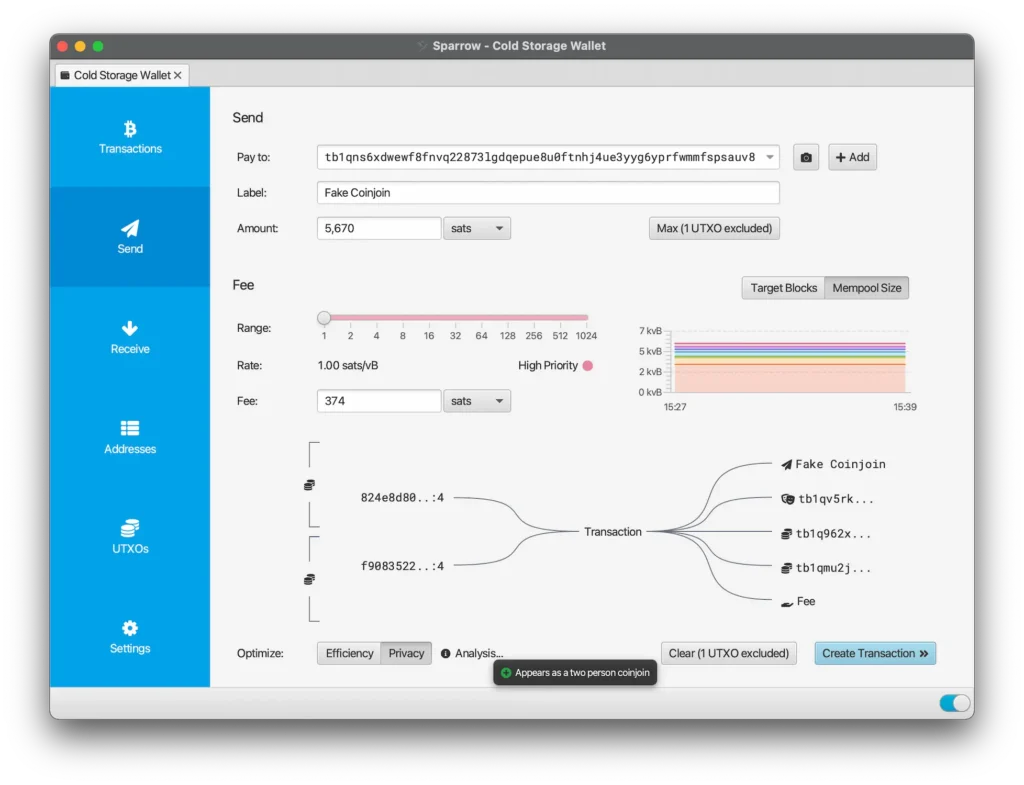
In this type of transaction, Sparrow creates a structure that mimics a collaborative transaction, It's as if two people were participating in the same shipment. To do this, you use two inputs (i.e. you need to control at least two UTXOs with a sufficient balance) and four outputs.
For example: suppose you want to send 5670 sats to an X address. In addition to this payment, you send other 5670 sats to a Y address that is also yours, while the rest of the values are returned to two different change addresses. For those observing the blockchain, there are now multiple plausible interpretations as to who paid whom and what the real destination of the funds was.
In practice, this structure significantly increases ambiguity of the transaction, reducing the ability of an external analyst to identify with certainty which output represents the actual payment and which are just internal reorganizations of their own bitcoins.
Integration with the Bitcoin node itself
Initially, you can connect the wallet to online servers that have a history of respecting privacy (such as the Blockstream server, DIYnodes or SethForPrivacy). But this requires trust, because technically they can view your transaction history and balance.
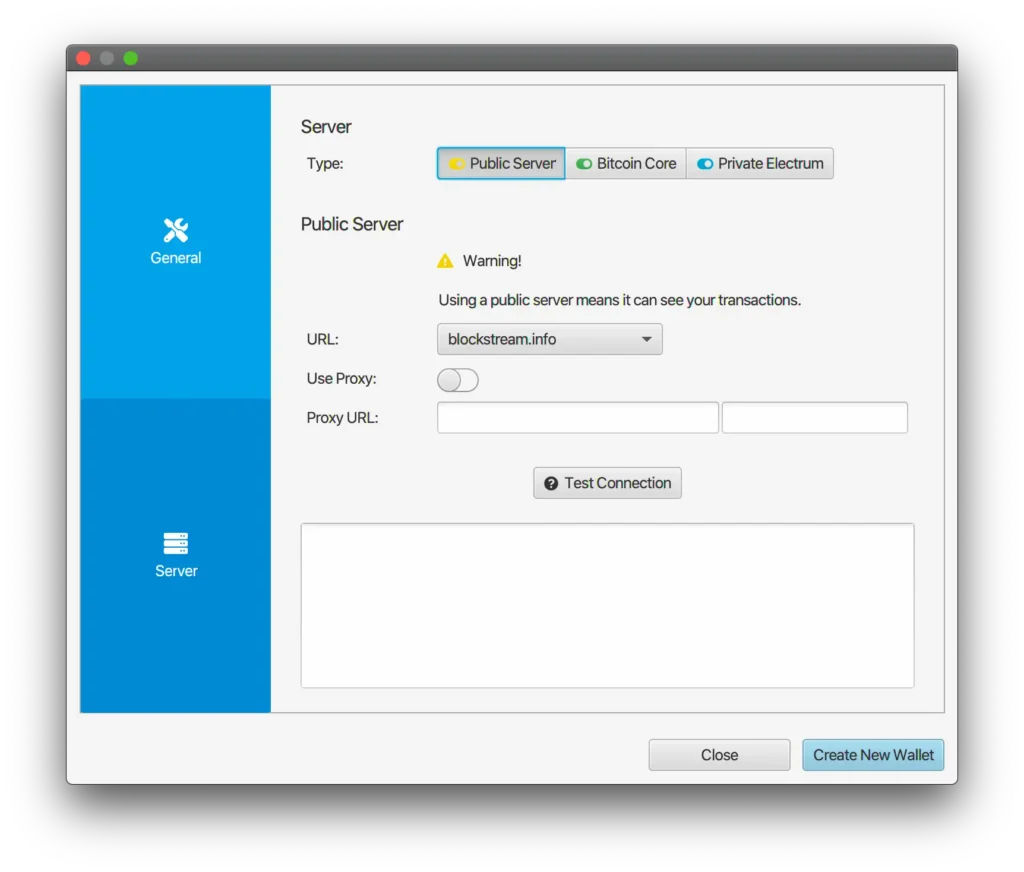
If you want to go one step further, you can run your own Bitcoin node and connect your wallet to it, ensuring greater privacy.
Is the Sparrow Wallet for you?
Before using Sparrow, it's important to understand whether it makes sense for your profile.
If you're looking for a simple “receive and send” wallet with as few buttons as possible, Sparrow might not be for you. We've already done a Blue Wallet and Blockstream App, These are wallets that are easier to use.
But if you already understand the basics of Bitcoin, care about your privacy, want fine control of UTXOs and fees, Sparrow is the wallet for you.
That said, let's go step by step!
How to download and install Sparrow Wallet
Visit the official website
Always download the Sparrow Wallet exclusively on the official website https://sparrowwallet.com/ e check the download according to the next step.
Check the authenticity of the software
In addition to downloading the installer for your operating system (Windows, macOS or Linux), also download the following files “Manifest” e “Manifest Signature”, keeping them all in the same folder (for example, Downloads).
When you open Sparrow Wallet, simply drag and drop any of these two files within the application. If a window appears with three green checks and the message “Signed By: Craig Raw ”, This confirms that the software has been signed by the original developer, Craig Raw, and it hasn't changed.
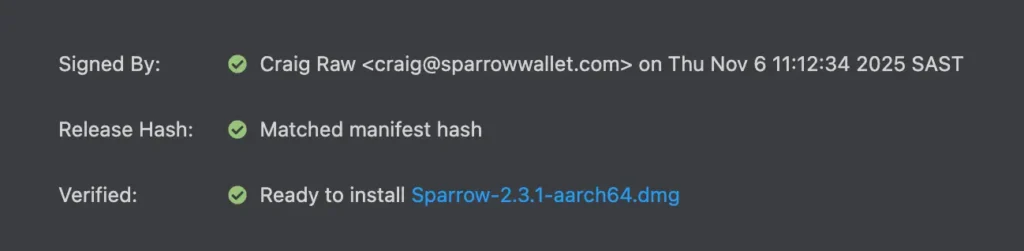
This procedure is essential to ensure that you are installing the Legitimate Sparrow Wallet, and not a fake version created to steal your coins.
Creating your Sparrow Wallet
When you create a wallet, you choose a name for it. This name is not shared with anyone and is only used for organization on your computer.
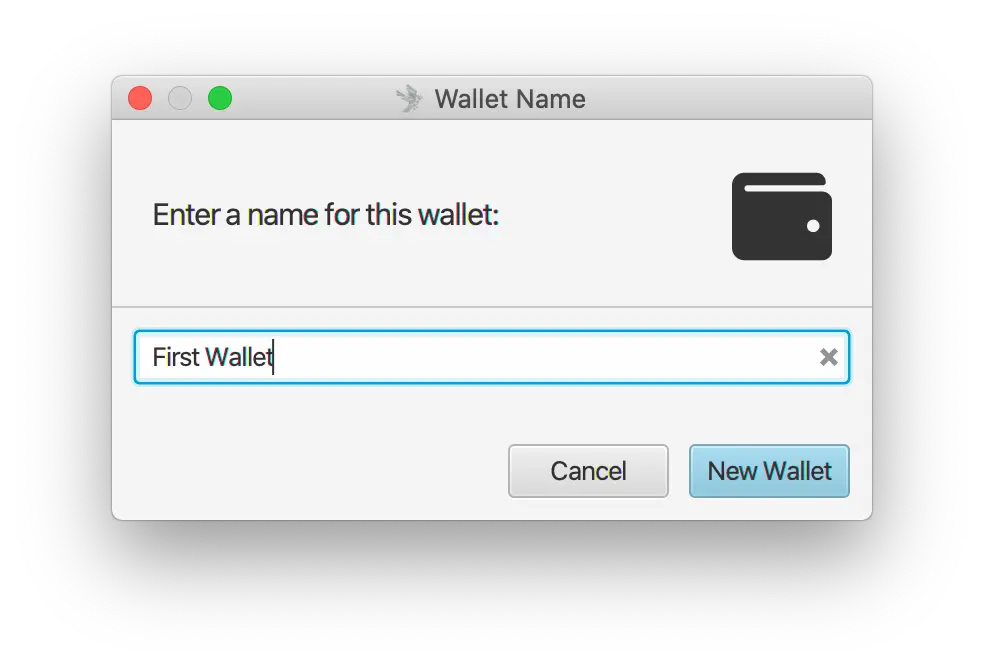
Then you can choose the wallet settings. For a simple single-signature wallet, just leave it at the default setting. If you are not using a hardware wallet, click on “New or Imported Software Wallet”.
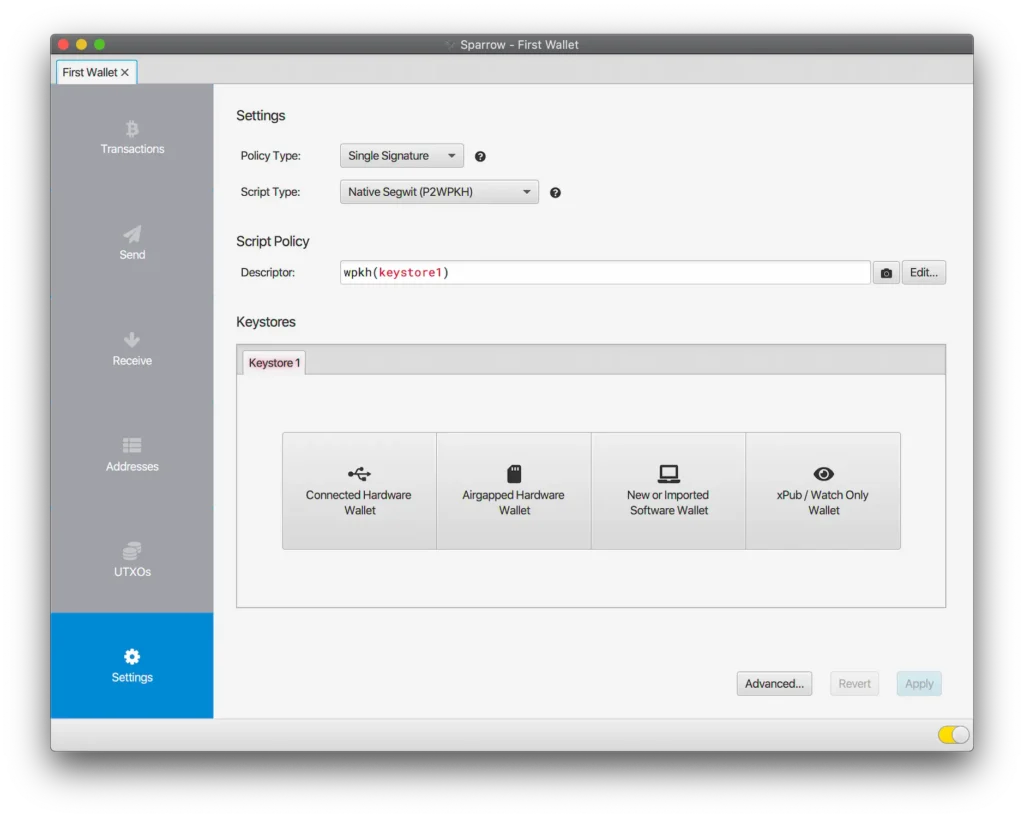
Generating your seed phrase
The last step in creating the wallet is to generate the private key. Sparrow gives you several alternative formats, but the most common at the moment is BIP39 of 12 words.
When it comes to your seed, you should prioritize simplicity and standardization to make it as easy as possible to retrieve your wallet in the event of something unforeseen.
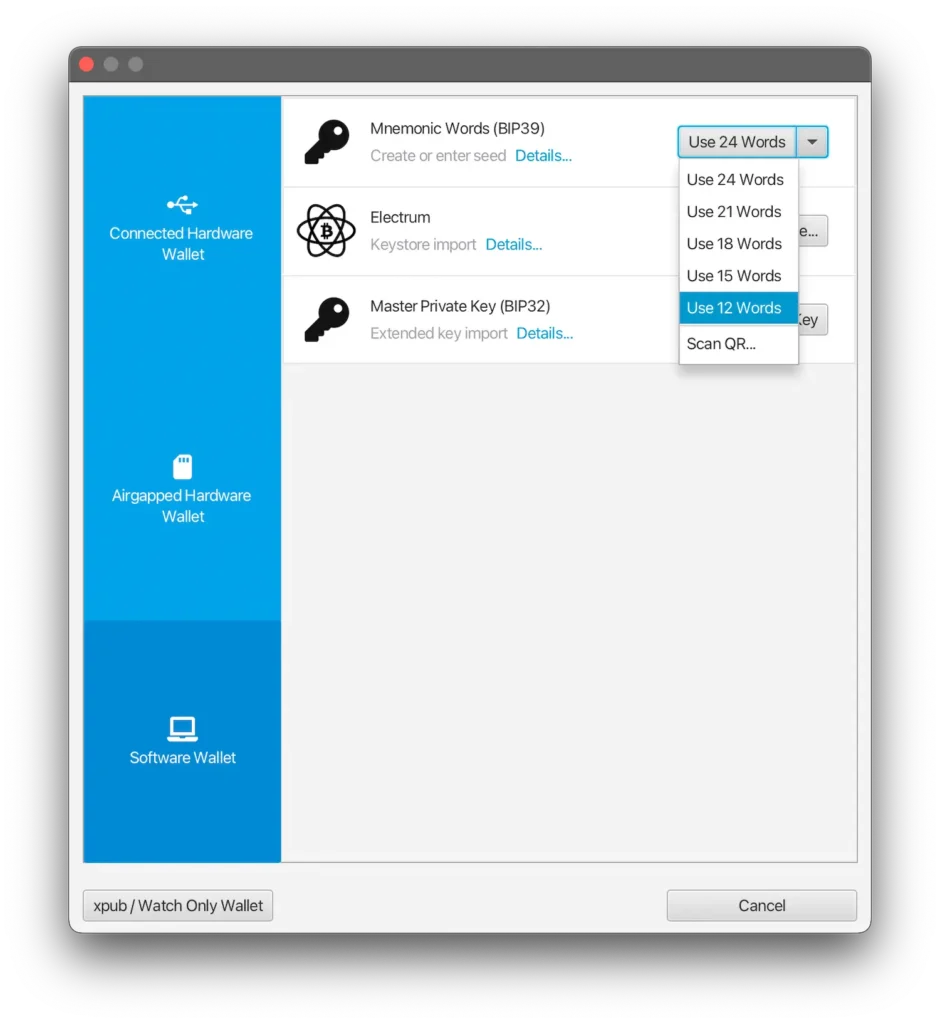
Tap on “Generate New” for the wallet to generate your 12 words and, optionally, check “Use Passphrase” to add an extra word of your choice.
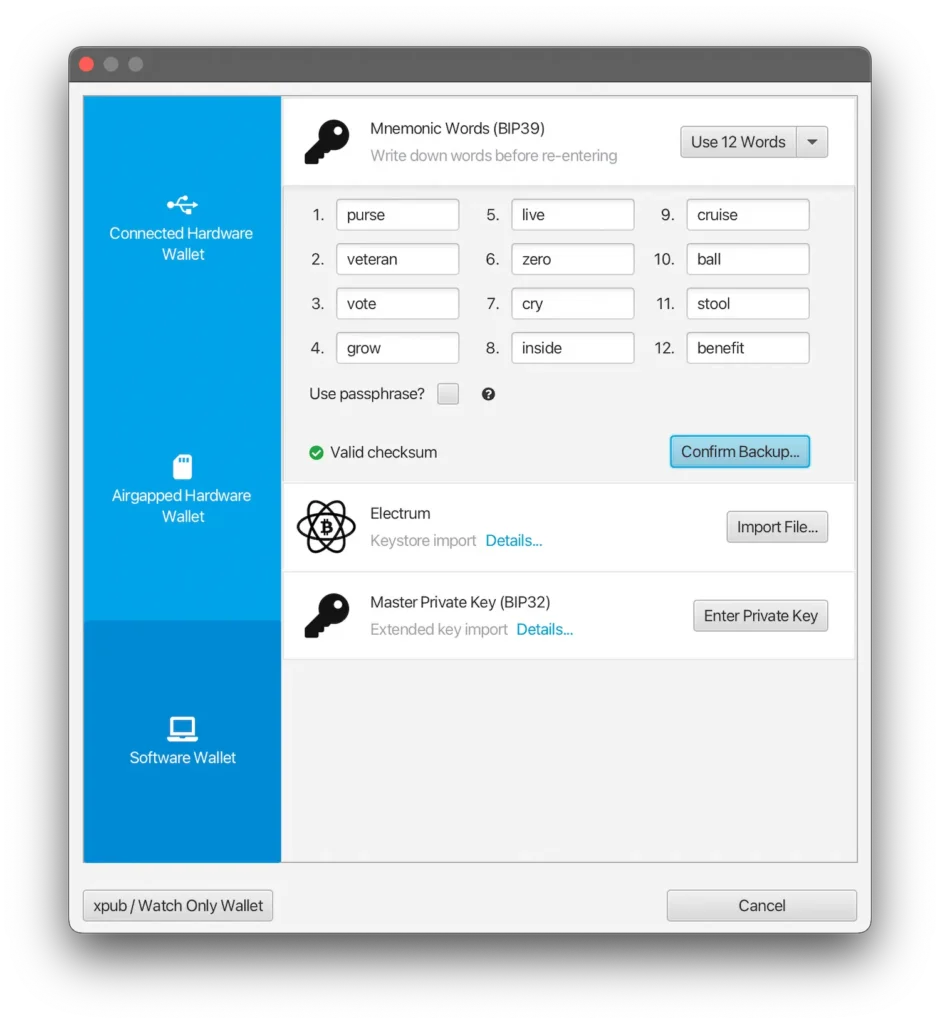
Remember that this represents “the key to the safe” for your bitcoins. Only with these words written down in order will you be able to access your wallet, should your computer break down, for example.
Good practices for seed backup:
- Write it down offline, on paper or metal plate
- Store in a safe place
- Never take a photo
- Never type it anywhere
After creating the wallet, Sparrow asks if you want to add a password. This password protects the local file from Sparrow on your computer, and you will need to enter it every time you open the wallet.
It is used to prevent physical access to the software, in case someone else gains access to your computer or laptop. Not to be confused with the seed phrase or passphrase, which are used to recover your funds in any other wallet software.
Receiving bitcoin
To receive bitcoin at Sparrow Wallet,
- Go to “Receive”
- Copy the address shown in address or scan the QR Code
- Use label to note where you are receiving this payment from
Labels are private notes and help a lot in organizing and managing UTXOs over time. You won't need to remember where you received each payment, and you'll know exactly which coins you don't want to spend together in the same transaction.
To preserve your privacy, avoid reusing addresses. Sparrow automatically generates a new address whenever the address displayed receives a payment.
However, if you want to anticipate this process, just click on “Get Next Address” to immediately generate a new receiving address. This can be useful if you are going to receive more than one payment in a short period of time.
Alternatively, you can click on “Addresses” and see an extensive list of addresses, used or not, organized into receiving addresses and change addresses.
Sending bitcoin
There are two main ways to send bitcoin on Sparrow:
- Select manually in “UTXOs” which coins you want to spend
- Or go to “Send”
To define who you want to pay, you can:
- Paste the address into “Pay to”
- Scan the QR Code by clicking on the camera icon
- Or by clicking on the down arrow to the right of the address field to select “Consolidation” (send to yourself) or “Payment Code” for payments using BIP47
- If you want to make more than one payment using the same transaction, you can add other addresses under “+ Add”
After that, you can set the rate manually, either by typing in exactly how many satoshis you want to pay, or by adjusting the slider at “Range”.
AttentionAt Sparrow, you control the rate. This requires intention and care when choosing the amount. The interface even warns you if the rate is higher than necessary, but does not prevent that you confirm a transaction and pay an unreasonably high fee if you make this mistake.
Finally, choose to optimize between efficiency and privacy, as we explained earlier.
Other features
In addition to what we've explored in this article, Sparrow also allows:
- Integration with hardware wallets via USB, MicroSD or QR Codes
- Creation of multi-signature portfolios (multisig)
- Signing and verifying messages
- Private key scanning (useful for old paper wallets)
More details can be read at documentation page from Sparrow Wallet.
Advantages and disadvantages of the Sparrow Wallet
Advantages
- Total control over your bitcoins
- Good level of privacy
- Ideal for advanced users
Disadvantages
- It requires care to avoid mistakes that can cost money or privacy, such as:
- consolidate UTXOs linked to your KYC with UTXOs acquired without KYC
- pay higher fees than necessary
- end up sharing sensitive information
Sparrow offers a lot of power, and that requires responsibility. Only use the features you understand and are confident in handling.
Conclusion
The Sparrow Wallet is a powerful tool for financial sovereignty, is designed for those who want to understand and control every aspect of bitcoin use.
If you're past the beginner stage, Sparrow could be the natural next step in your journey.






 English